



 Australia








Lucky Vibe Casino Login
Most members reach us from a phone, so this page starts there. The Lucky Vibe Casino login asks for an email address and a password — no usernames, no extra codes to remember. Below: signing in on mobile and on a computer, keeping the account secure, and getting back in when something blocks the way.
Lucky Vibe Casino Login from Your Phone
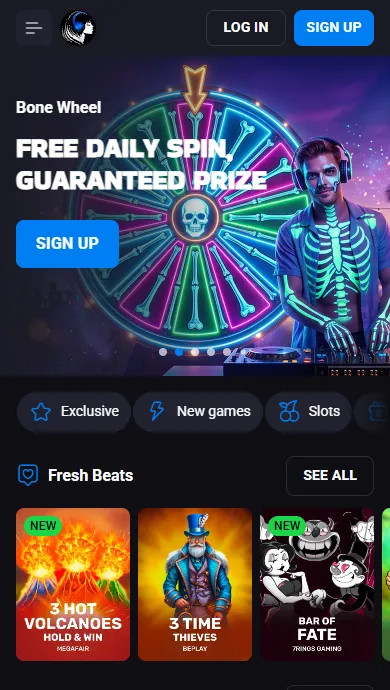
Open our site in the mobile browser you already use — Safari, Chrome or any other. Tap Log In in the header, fill in the two fields and confirm. The lobby loads with your balance, and the session stays open while you play.
Want one-tap access? Turn the site into a web app on your home screen:
- Android: tap the three dots in the browser menu, choose "Add to Home Screen", then "Install".
- iPhone: in Safari, press "Share", select "Add to Home Screen", then "Add".
There is nothing to download from a store, and the icon behaves like any other app on the device. It opens the same account as the desktop site, so moving between your phone and a laptop never means a second profile. If the mobile screen feels cramped, rotate the device or zoom out in the browser settings. Check the security settings of the phone too: a screen lock protects your account if the device is lost or borrowed.
Desktop Sign-In, Step by Step
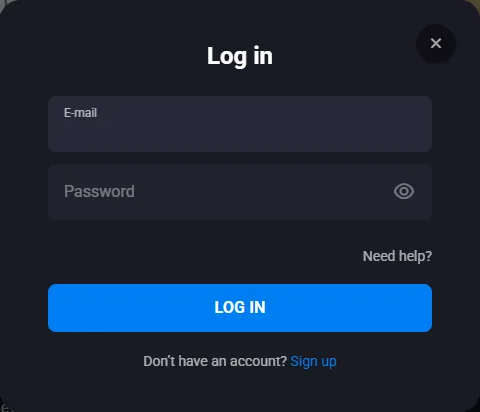
On a computer, the routine is short. This is the Lucky Vibe Casino login Australia members see on desktop:
- 1Go to our home page on your computer.
- 2Press Log In in the header.
- 3Enter the details linked to your account.
- 4Confirm, and the lobby opens.
Haven't joined yet? Choose Sign Up. The form asks for your contact address and phone number, a password, the country you live in and the currency — AUD here — plus a tick that you are over 18. The sign-up form also has a box for a bonus code. After that, the same pair of details works everywhere.
Keeping Your Lucky Vibe Account Safe
Your data travels to us over 128-bit SSL encryption, but account security also depends on a few habits on your side. Pick a unique passphrase for us, and let a password manager store it instead of a note on the device. Keep your email inbox protected as well, because reset instructions always go there.
On a shared or public device, do not let the browser save your details, and log out when you finish. Close the session the same way on a work computer. For extra security, never share your details with anyone, including people who say they are from our team. If you notice activity you do not recognise, change it at once with "Need help?" and tell our team in chat.
Verification adds another layer. Before the first withdrawal, documents go through the Documents tab of your profile, so only you can cash out your balance. The Lucky Vibe Casino login stays the same after verification — nothing about signing in changes.
Back In After a Forgotten Password
A lost password is fixed in a minute. Under the login fields, press "Need help?" and choose the reset option. On the Reset Password screen, type the email of your account and send the request. We email you instructions; follow them to set a new password. The instructions go only to the address on file, so nobody else can take over the account this way.
If nothing arrives, look in the spam folder, check that the address is the one you registered with, and send the forgot password request again. Our support team can also help: write to support@luckyvibe.com or open the chat. Once the new one is set, the Lucky Vibe Casino login works as before on every device.
Login Trouble? Here's How We Help
Most failed attempts come down to small things. When the Lucky Vibe Casino login keeps refusing you:
- Re-type the password by hand; autofill may hold an old one.
- Clear cookies and the cache for our site, then reload the browser.
- Restart the session on another connection, Wi-Fi or mobile data.
- If the handset still struggles, try the same details on a different device.
None of that helped? Our support staff work 24/7 and answer in live chat. A real person, not a bot, will look at the problem with you and suggest a reset if needed. Tell us the address on the account, and the team will check what is going on.
Lucky Vibe Casino Login Australia: Questions
Why am I signed out when my phone switches from Wi-Fi to mobile data?
A change of network can end the current session. Open the site again and enter your details; your balance and bonus are where you left them.
Can I unlock the login with Face ID or a fingerprint?
We sign members in with an address and a password. Your phone's password manager can fill both after a fingerprint or face check, which keeps the details secure on the device.
The password reset email hasn't arrived — what now?
Check spam, confirm the address and repeat the request. If it still doesn't come, our support team will help in chat.
Is there a Lucky Vibe app for signing in?
We offer a web app: add the site to your home screen from the browser. It shows the same account, deposit options and promotions as the full site. Android users install it from the three-dot menu, iPhone users from the Share button in Safari.
Can I sign in from anywhere in Australia?
Our Australian site runs in AUD and takes the same details on mobile and on a computer. After you sign up, one account covers all your devices.